Sorting Analysis
Consider a finite collection of orderable elements. Re-arranging that collection so that, the collection is completely ordered, is called sorting. There are many techiniques to sort a collection. Following is some of the comparision based Sorting Algorithms.
- Bubble Sort
- Insertion Sort
- Selection Sort
- Merge Sort
- Quick Sort
- Heap Sort
Before looking at the analysis part, we shall examine the Language in built methods to sorting
sorted(collection,reverse = False[,key])
This function takes an iterable as argument, and returns it in sorted
form based on key. If key is not given, sorting is done according to
default comparision rules. Let’s see the examples and understand the
working of sorted(). If reverse is True, reversed collection
is returned after sorting
In [1]:
x = list(range(10))
import random
random.shuffle(x
In [2]:
x
Out[2]:
[6, 7, 9, 0, 4, 5, 8, 2, 1, 3]
In [3]:
sorted(x)
Out[3]:
[0, 1, 2, 3, 4, 5, 6, 7, 8, 9]
In [4]:
import math
y  = sorted(x,key = lambda x: math.sin(x))  # Sort x in the
y
Out[4]:
[5, 4, 6, 0, 3, 9, 7, 1, 2, 8]
In [5]:
[math.sin(i) for i in y]
Out[5]:
[-0.9589242746631385,
 -0.7568024953079282,
 -0.27941549819892586,
 0.0,
 0.1411200080598672,
 0.4121184852417566,
 0.6569865987187891,
 0.8414709848078965,
 0.9092974268256817,
 0.9893582466233818]
Note how the elements of sin(y) are in increasing order
Standard import statement
In [6]:
from openanalysis.sorting import SortingAlgorithm,SortVisualizer
import numpy as np   # for doing vstack()
SortingAlgorithm is the base class providing the standards to
implement sorting algorithms, SortVisualizer visualizes and analyses
the algorithm
SortingAlgorithm class
Any sorting algorithm, which has to be implemented, has to be derived from this class. Now we shall see data members and member functions of this class.
Data Members
name- Name of the Sorting Algorithmcount- Holds the number of basic operations performedhist_arr- A 2Dnumpyarray, holding the instances of array, as exchange is performed
Member Functions
__init__(self, name):- Initializes algorithm with anamesort(self, array, visualization):_ The base sorting function. Setscountto 0.arrayis 1Dnumpyarray,visualizationis aboolindicating whetherarrayhas to bevstacked intohist_arr
An example …. Bubble Sort
Now we shall implement the class BubbleSort
In [7]:
class BubbleSort(SortingAlgorithm):                        # Derived from SortingAlgorithm
    def __init__(self):
        SortingAlgorithm.__init__(self, "Bubble Sort")     # Initializing with name

    def sort(self, array, visualization=False):            # MUST have this signature
        SortingAlgorithm.sort(self, array, visualization)  # sets self.count to 0
        for i in range(0, array.size):                     # Not len(array)
            exch = False
            for j in range(0, array.size - i - 1):
                self.count += 1                            # Increment self.count after each basic operation
                if array[j] > array[j + 1]:
                    array[j], array[j + 1] = array[j + 1], array[j]
                    exch = True
                if visualization:
                    self.hist_array = np.vstack([self.hist_array, array]) # Save the current state to hist_arr
            if not exch:
                break
        if visualization:
            self.hist_array = np.vstack([self.hist_array, array])  # Save the final state to hist_arr
SortVisualizer class
This class provides the visualization and analysis methods. Let’s see its methods in detail
__init__(self, sorter):Initializes visualizer with a Sorting Algorithm.sorteris a class, which is derived fromSortingAlgorithm
visualize(self, num=100, save=False):Visualizes the given algorithm with a randomly shuffeled array.numsize of randomly shuffeled arraysaveisTruemeans animation is saved inoutput/
efficiency(self, maxpts=1000):- Plots the running time of sorting algorithm by sorting for 3 cases
- Already Sorted array, reverse sorted array and Shuffled array
- Analysis is done by inputting randomly shuffled integer arrays
with size staring from 100, and varying upto
maxptsin the steps of 100, and counting the number of basic operations maxptsUpper bound on size of elements chosen for analysing efficiency
In [8]:
bubble_visualizer = SortVisualizer(BubbleSort)
In [9]:
bubble_visualizer.efficiency()
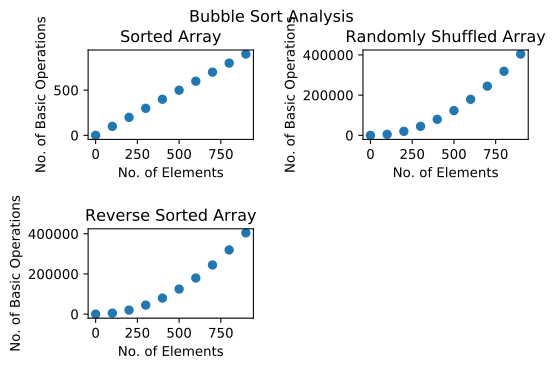
As you can see in the above plot, BubbleSort takes  time
on best case and
time
on best case and  time on both avarage and worst cases
You can call to visualize function as this and see the ‘mp4’ file saved
at output/ folder
bubble_visualizer.visualize(save=True)
compare(algs)
algs is a list of classes derived from SortingAlgorithm. It
performs tests and plots the bar graph comapring the number of basic
operations performed by each algorithm.
Why a class if sorting could be done at a function
We have just seen how BubbleSort is implemented. Every sorting
algorithm is not as simple as BubbleSort. QuickSort and MergeSort
needs several auxulary methods to work with. If they are scattered
throughout the code, they decrease the readability. So it is better to
pack everything in a class.